RL Tutor: an agent for learning post-training
This week Thinking Machines released Inkling, an open-weights model built for customization and available for fine-tuning through its Tinker API. I've wanted to learn how to fine-tune my own models for a while, and this felt like as good a time as any to start. So I built an agent to do it with me.
Meet RL Tutor, an agent that helps me learn and post-train my own models. I don't want a chatbot that knows LoRA. I want an agent that helps me study the field, build datasets, run experiments, and record what we learn. Here's the loop I'm after:
       drop a link · ask a question
                     │
                     ▼
         ┌───────────────────────┐
         │       RESEARCH        │  web_search + web_fetch
         │   articles · papers   │  primary sources, cited
         └───────────┬───────────┘
                     │  filed as pages
                     ▼
         ┌───────────────────────┐
     ┌──▶│         WIKI          │  markdown on disk
     │   │  one concept per page │  explore in Obsidian
     │   └───────────┬───────────┘
     │               │  becomes context
     │               ▼
     │   ┌───────────────────────┐
     │   │       LEARNINGS       │  LearningMachines
     │   │  what worked and why  │  memory + learning
     │   └───────────┬───────────┘
     │               │  guides experiments
     │               ▼
     │   ┌───────────────────────┐
     │   │      POST-TRAIN       │  Tinker API
     │   │ datasets · fine-tunes │  base vs tuned evals
     │   └───────────┬───────────┘
     │               │
     └───────────────┘
       experiment reports feed back into the wiki
My end goal is to fine-tune Inkling, but I'm starting with the cheaper Qwen MoE as a first step. RL Tutor plugs into Claude Code and Codex via MCP, because that's where I write most of my code.
How it works
RL Tutor operates in two modes:
- Study mode. RL Tutor maintains a Markdown wiki inspired by Andrej Karpathy's LLM knowledge bases. Drop a link and it converts a raw source into knowledge; ask a question and it answers from the wiki.
- Build mode. When a Tinker key is set, RL Tutor gets tools for creating datasets and running fine-tunes. It compares the tuned checkpoint with the base model and files the experiment back into its wiki.
I use RL Tutor entirely through my coding agents. For example, here's RL Tutor adding a doc to its wiki:
Add https://thinkingmachines.ai/news/introducing-inkling/ to the wiki
The wiki, datasets, and reports are stored locally as plain files. I can inspect everything in my editor or in Obsidian:
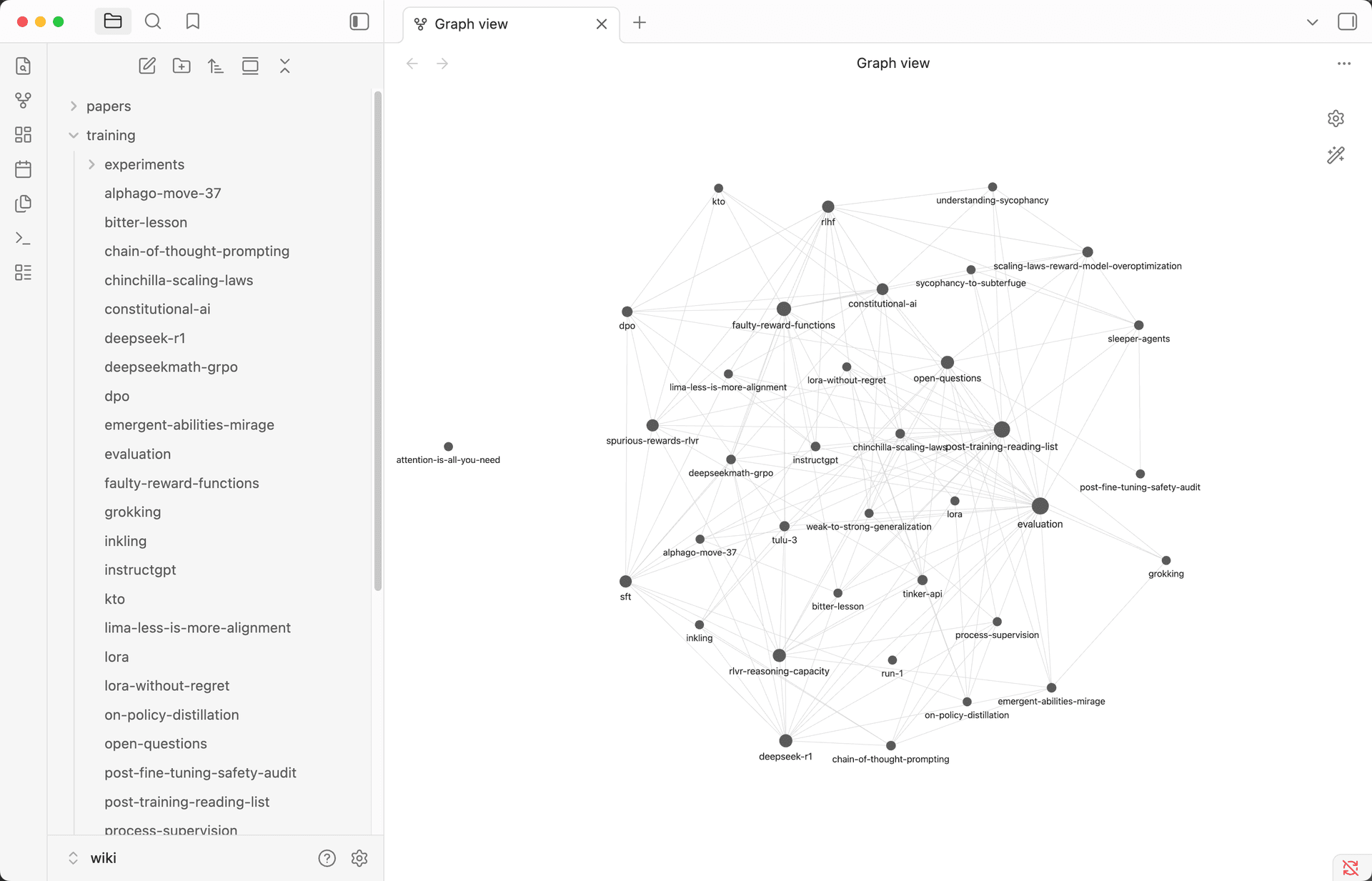
As the wiki grows, it becomes the context for the next experiment. When an experiment finishes, or fails, the report becomes another source the tutor can learn from.
The agent
The agent itself is relatively simple. The full code is here, but here's the gist of it:
"""RL Tutor: an agent that teaches me post-training."""

from os import getenv

from agno.agent import Agent
from agno.db.sqlite import SqliteDb
from agno.models.openai import OpenAIResponses

from .learning import LEARNER_INSTRUCTIONS, learning_machine
from .tinker_tools import TinkerTools
from .wiki import parallel_web, wiki

FOCUS = f"""<focus>
You are RL Tutor. You are teaching us to train our own models with Tinker,
Thinking Machines' fine-tuning API. Inkling is the primary study subject.
For the first hands-on training runs, use the cheaper default Qwen MoE.

Working style:
- Answer established training questions from the wiki, citing pages. For
  facts that may have changed or gaps in the wiki, use web_search and web_fetch
  as needed, prefer primary sources, and cite their URLs in the answer.
- File training knowledge under training/, one concept per page: the model
  (training/inkling.md), the API (training/tinker-api.md), methods like LoRA and RL, recipes, costs.
- Keep training/open-questions.md current: add questions we cannot answer
  yet; when a new page answers one, remove it and cite the page.
...
</focus>
"""

tools = [*wiki.get_tools(), *parallel_web.get_tools()]
if getenv("TINKER_API_KEY"):
    tools.append(
        TinkerTools(wiki_path=str(wiki.backend.path), datasets_path=str(DATASETS_PATH))
    )

tutor = Agent(
    name="RL Tutor",
    model=OpenAIResponses(id="gpt-5.6"),
    db=SqliteDb(db_file=str(DB_FILE)),
    tools=tools,
    learning=learning_machine,
    instructions=[wiki.instructions(), FOCUS],
    add_history_to_context=True,
    num_history_runs=5,
    # Tool transcripts are preserved in the db but we should
    # avoid injecting bulky datasets and reports into every prompt.
    # The tutor can fetch them from history on demand.
    max_tool_calls_from_history=0,
    read_chat_history=True,
    search_past_sessions=True,
    num_past_sessions_to_search=10,
    num_past_session_runs_in_search=2,
    add_datetime_to_context=True,
)
Current status
RL Tutor is a work in progress. The code is available at ashpreetbedi/rl-tutor.
I've tested the study loop and completed two small, paid Tinker runs. The first run trained but exposed a sampling bug. The second completed end to end and produced clean outputs.
That proves the training, checkpoint, comparison, and reporting pipeline can run. It does not prove the fine-tuned model learned the behavior or is usable in any shape or form.
Try it with me
To try RL Tutor with me, clone the repo, set up the env and credentials, and run the app.
# Clone and cd
git clone https://github.com/ashpreetbedi/rl-tutor && cd rl-tutor

# Setup env
uv venv --python 3.12 .venv && source .venv/bin/activate && uv sync --locked -q

cp example.env .env
# Export the following keys or set in your .env
export OPENAI_API_KEY="sk-..."
export TINKER_API_KEY="..."
export PARALLEL_API_KEY="..."

# Run RL Tutor on AgentOS
python app.py
Your RL Tutor is live at localhost:7777, served with AgentOS — I wrote about why serving agents takes more than a vanilla FastAPI server in FastAPI for Agents. Access it using:
- Chat UI. Open os.agno.com, connect to
http://localhost:7777, and chat with the tutor, browse its sessions, memory, and runs. - REST API at localhost:7777/docs, because it's FastAPI.
- MCP server. Add it to Claude Code and the tutor becomes available in your coding agent.
Add RL Tutor to your coding agents
This is the key part for me:
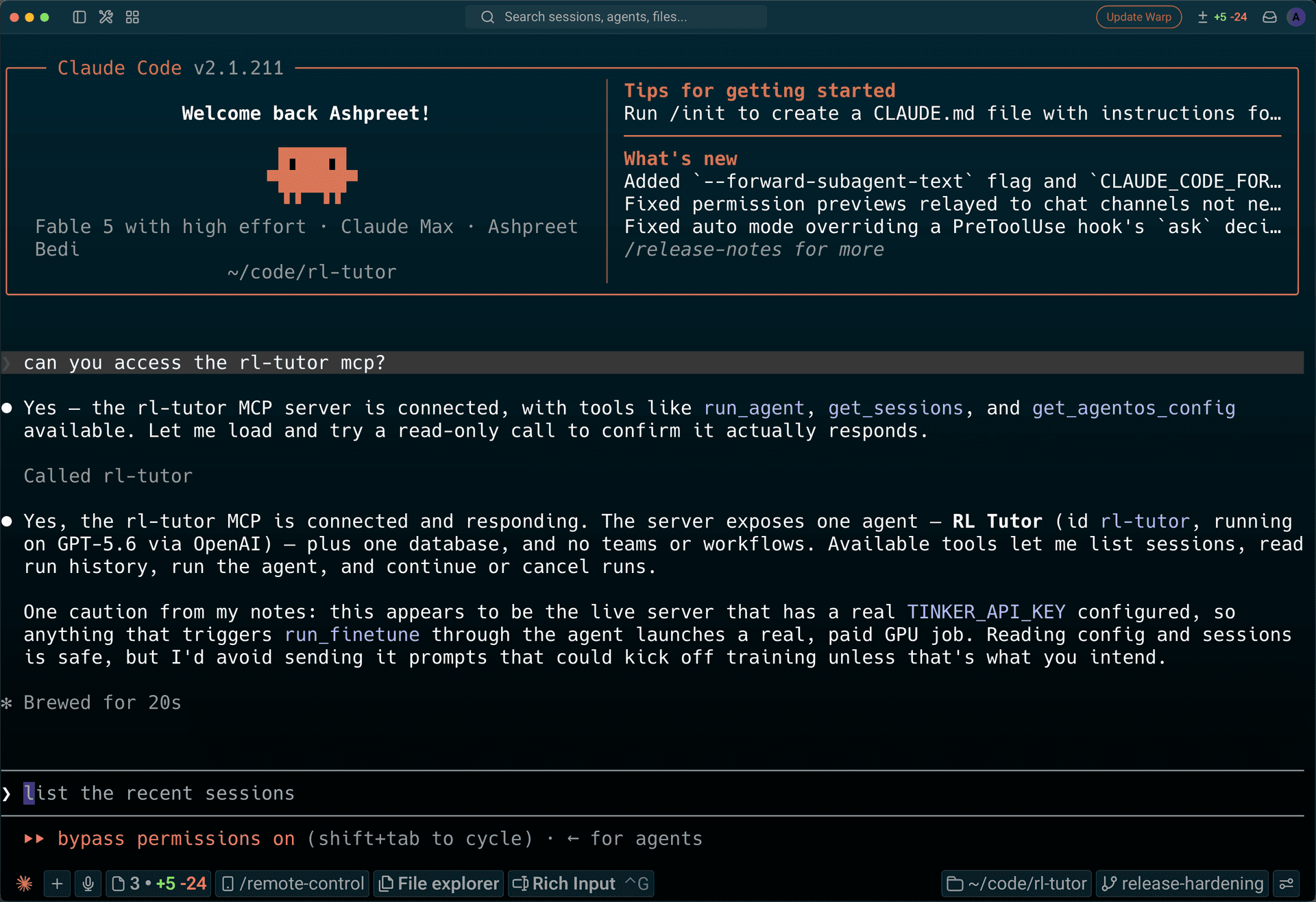
rl-tutorplugs into my coding agents with one command, and that's where I write most of my code.
Open another terminal and run:
uvx agno connect --url http://localhost:7777 --server-name rl-tutorThen open (or restart) Claude Code — or whichever coding agent you use — and ask: "can you access the rl-tutor mcp?"
First training run
Ask Claude Code to prepare our first training run:
ask rl-tutor to teach me how I would train my first model with Tinker. This is a
walkthrough only: do not call any Tinker tools or create any files. Use the
canonical 30-example haiku experiment and give me five numbered steps covering
the Tinker key, dataset design, saving the dataset, running the fine-tune, and
inspecting the report. End with a separate prompt I can send later if I choose
to run it, then stop without training anything.The first experiment is intentionally small: 30 examples that teach a model to answer in haiku, followed by a base-versus-tuned comparison. Once the walkthrough makes sense, I can run the fine-tune using:
Run the haiku fine-tune now. Create and save a strong 30-example dataset, wait for the saved confirmation, then run the finetune.
As a reminder: a completed report means the pipeline ran end to end, not that the model learned the behavior.
What's next
I'll continue to learn and explore, turning what I learn into datasets, running small experiments, comparing the results, and filing what happened back into the wiki. After that, I'll keep the experiments small and change one variable at a time—dataset quality, epochs, learning rate, or model. The long-term path still points toward Inkling, DPO, and RL, but I want to earn the steps.
If you try RL Tutor, tell me what worked, what broke, and what confused you. Open an issue or send me a note. I'll keep updating the repo as I learn.
Thanks for reading!
Ashpreet